
Xử lý dữ liệu từ onboarding trong Kotlin Multiplatform SDK
Onboarding đã bị deprecated trong SDK v4 và sẽ bị xóa trong các phiên bản tương lai. Chúng không còn nhận được các bản sửa lỗi hay cải tiến nữa. Hãy sử dụng flows thay thế: khác với onboarding chạy trong WebView, flows render trực tiếp trên thiết bị — mang lại hiệu ứng animation mượt mà hơn, giao diện native nhất quán, thời gian tải nhanh hơn và không phụ thuộc vào WebView runtime. Xem Lấy flows & paywalls và Hiển thị flows & paywalls để bắt đầu.
Khi người dùng trả lời câu hỏi trong bài quiz hoặc nhập dữ liệu vào trường nhập liệu, phương thức onboardingViewOnStateUpdatedAction sẽ được gọi. Bạn có thể lưu hoặc xử lý loại trường đó trong code của mình.
Ví dụ:
class MyAdaptyUIOnboardingsEventsObserver : AdaptyUIOnboardingsEventsObserver {
    override fun onboardingViewOnStateUpdatedAction(
        view: AdaptyUIOnboardingView,
        meta: AdaptyUIOnboardingMeta,
        elementId: String,
        params: AdaptyOnboardingsStateUpdatedParams
    ) {
        // Store user preferences or responses
        when (params) {
            is AdaptyOnboardingsSelectParams -> {
                // Handle single selection
                val id = params.id
                val value = params.value
                val label = params.label
                AppLogger.d("Selected option: $label (id: $id, value: $value)")
            }
            is AdaptyOnboardingsMultiSelectParams -> {
                // Handle multiple selections
            }
            is AdaptyOnboardingsInputParams -> {
                // Handle text input
            }
            is AdaptyOnboardingsDatePickerParams -> {
                // Handle date selection
            }
        }
    }
}

// Set up the observer
AdaptyUI.setOnboardingsEventsObserver(MyAdaptyUIOnboardingsEventsObserver())
Ví dụ dữ liệu đã lưu (định dạng có thể khác trong phần triển khai của bạn)
    // Example of a saved select action
    {
        "id": "onboarding_on_state_updated_action",
        "view": { /* AdaptyUI.OnboardingView object */ },
        "meta": {
        "onboarding_id": "onboarding_123",
        "screen_cid": "preferences_screen",
        "screen_index": 1,
        "total_screens": 3
    },
        "action": {
        "element_id": "preference_selector",
        "element_type": "select",
        "value": {
        "id": "option_1",
        "value": "premium",
        "label": "Premium Plan"
    }
    }
    }

    // Example of a saved multi-select action
    {
        "id": "onboarding_on_state_updated_action",
        "view": { /* AdaptyUI.OnboardingView object */ },
        "meta": {
        "onboarding_id": "onboarding_123",
        "screen_cid": "interests_screen",
        "screen_index": 2,
        "total_screens": 3
    },
        "action": {
        "element_id": "interests_selector",
        "element_type": "multi_select",
        "value": [
    {
        "id": "interest_1",
        "value": "sports",
        "label": "Sports"
    },
    {
        "id": "interest_2",
        "value": "music",
        "label": "Music"
    }
        ]
    }
    }

    // Example of a saved input action
    {
        "id": "onboarding_on_state_updated_action",
        "view": { /* AdaptyUI.OnboardingView object */ },
        "meta": {
        "onboarding_id": "onboarding_123",
        "screen_cid": "profile_screen",
        "screen_index": 0,
        "total_screens": 3
    },
        "action": {
        "element_id": "name_input",
        "element_type": "input",
        "value": {
        "type": "text",
        "value": "John Doe"
    }
    }
    }

    // Example of a saved date picker action
    {
        "id": "onboarding_on_state_updated_action",
        "view": { /* AdaptyUI.OnboardingView object */ },
        "meta": {
        "onboarding_id": "onboarding_123",
        "screen_cid": "profile_screen",
        "screen_index": 0,
        "total_screens": 3
    },
        "action": {
        "element_id": "birthday_picker",
        "element_type": "date_picker",
        "value": {
        "day": 15,
        "month": 6,
        "year": 1990
    }
    }
    }
Các trường hợp sử dụng
Làm phong phú hồ sơ người dùng với dữ liệu
Nếu bạn muốn liên kết ngay dữ liệu đầu vào với hồ sơ người dùng và tránh hỏi họ hai lần cùng một thông tin, bạn cần cập nhật hồ sơ người dùng với dữ liệu đầu vào khi xử lý action.
Ví dụ: bạn yêu cầu người dùng nhập tên vào trường văn bản có ID là name, và bạn muốn đặt giá trị của trường này làm tên của người dùng. Ngoài ra, bạn yêu cầu họ nhập email vào trường email. Trong code của ứng dụng, nó có thể trông như thế này:
class MyAdaptyUIOnboardingsEventsObserver : AdaptyUIOnboardingsEventsObserver {
    override fun onboardingViewOnStateUpdatedAction(
        view: AdaptyUIOnboardingView,
        meta: AdaptyUIOnboardingMeta,
        elementId: String,
        params: AdaptyOnboardingsStateUpdatedParams
    ) {
        // Store user preferences or responses
        when (params) {
            is AdaptyOnboardingsInputParams -> {
                // Handle text input
                val builder = AdaptyProfileParameters.Builder()

                // Map elementId to appropriate profile field
                when (elementId) {
                    "name" -> {
                        when (val input = params.input) {
                            is AdaptyOnboardingsTextInput -> {
                                builder.withFirstName(input.value)
                            }
                        }
                    }
                    "email" -> {
                        when (val input = params.input) {
                            is AdaptyOnboardingsEmailInput -> {
                                builder.withEmail(input.value)
                            }
                        }
                    }
                }

                // Update profile asynchronously
                mainUiScope.launch {
                    val profileParams = builder.build()
                    val result = Adapty.updateProfile(profileParams)
                    result.onSuccess { profile ->
                        // Profile updated successfully
                        AppLogger.d("Profile updated: ${profile.email}")
                    }.onError { error ->
                        // Handle the error
                        AppLogger.e("Failed to update profile: ${error.message}")
                    }
                }
            }
        }
    }
}

// Set up the observer
AdaptyUI.setOnboardingsEventsObserver(MyAdaptyUIOnboardingsEventsObserver())
Tùy chỉnh paywall dựa trên câu trả lời
Bằng cách sử dụng các bài quiz trong onboarding, bạn cũng có thể tùy chỉnh paywall hiển thị cho người dùng sau khi họ hoàn thành onboarding.
Ví dụ, bạn có thể hỏi người dùng về kinh nghiệm thể thao của họ và hiển thị các CTA và sản phẩm khác nhau cho các nhóm người dùng khác nhau.
- Thêm một bài quiz trong trình tạo onboarding và gán ID có ý nghĩa cho các tùy chọn của nó.
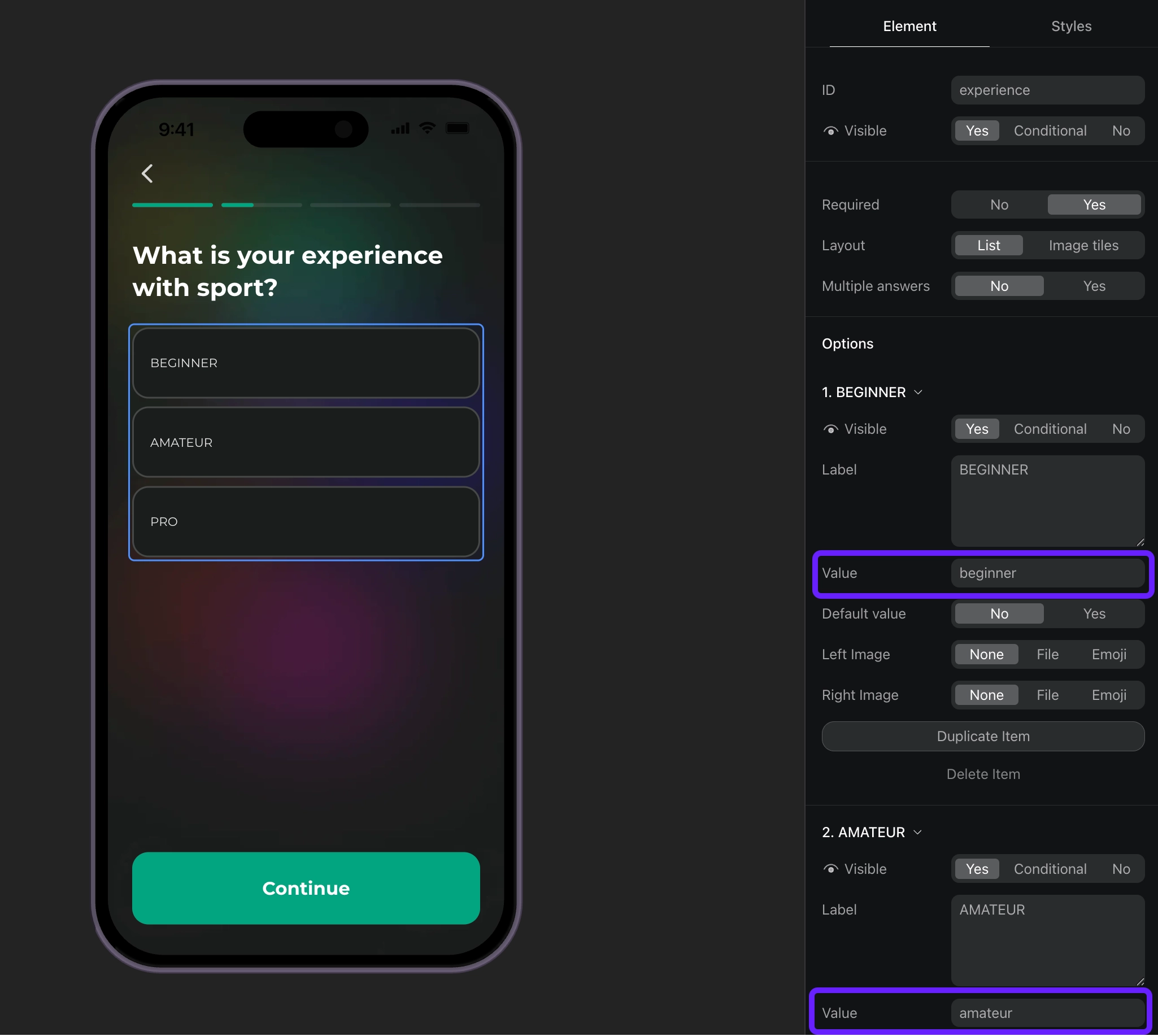
- Xử lý các phản hồi bài quiz dựa trên ID của chúng và đặt thuộc tính tùy chỉnh cho người dùng.
class MyAdaptyUIOnboardingsEventsObserver : AdaptyUIOnboardingsEventsObserver {
    override fun onboardingViewOnStateUpdatedAction(
        view: AdaptyUIOnboardingView,
        meta: AdaptyUIOnboardingMeta,
        elementId: String,
        params: AdaptyOnboardingsStateUpdatedParams
    ) {
        // Handle quiz responses and set custom attributes
        when (params) {
            is AdaptyOnboardingsSelectParams -> {
                // Handle quiz selection
                val builder = AdaptyProfileParameters.Builder()

                // Map quiz responses to custom attributes
                when (elementId) {
                    "experience" -> {
                        // Set custom attribute 'experience' with the selected value (beginner, amateur, pro)
                        builder.withCustomAttribute("experience", params.value)
                    }
                }

                // Update profile asynchronously
                mainUiScope.launch {
                    val profileParams = builder.build()
                    val result = Adapty.updateProfile(profileParams)
                    result.onSuccess { profile ->
                        // Profile updated successfully
                        AppLogger.d("Custom attribute 'experience' set to: ${params.value}")
                    }.onError { error ->
                        // Handle the error
                        AppLogger.e("Failed to update profile: ${error.message}")
                    }
                }
            }
        }
    }
}

// Set up the observer
AdaptyUI.setOnboardingsEventsObserver(MyAdaptyUIOnboardingsEventsObserver())- Tạo phân khúc cho mỗi giá trị thuộc tính tùy chỉnh.
- Tạo một placement và thêm đối tượng cho mỗi phân khúc bạn đã tạo.
- Hiển thị paywall cho placement trong code của ứng dụng. Nếu onboarding của bạn có nút mở paywall, hãy triển khai code paywall như một phản hồi cho hành động của nút này.